
Programming technique · B3.2.1 · Higher level only
Inheritance
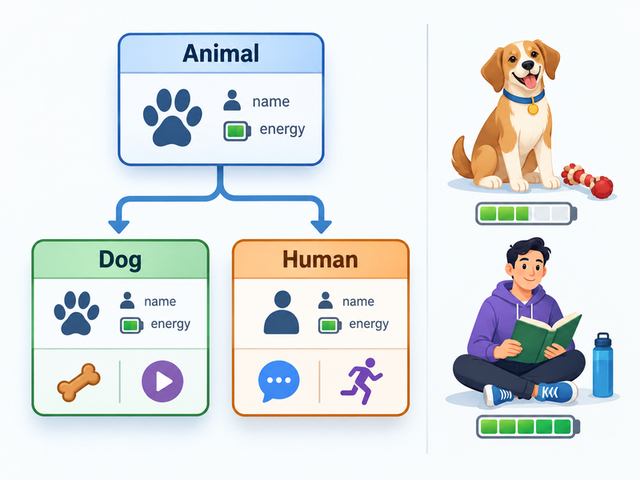
Inheritance allows a specialised child class to reuse and extend a defensible parent-class design. The code is usually short; the important decision is whether the relationship genuinely represents an is-a hierarchy.
Start with the relationship, not the keyword
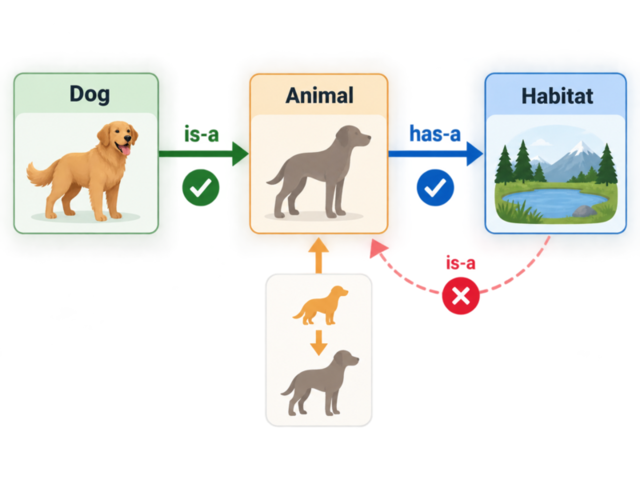
Dog is an Animal
A Dog can reuse shared Animal state and behaviour, then add specialised details.
Human is an Animal
A Human is another specialised Animal type with additional state and behaviour.
Habitat is not an Animal
An Animal may have a Habitat, but that whole–part relationship is not inheritance.
Parent class
Animal
shared name, energy and behaviour
Child class
Dog
toy and play behaviour
Child class
Human
language and exercise behaviour
Apply the hierarchy in Java
extends establishes the relationship. Each child constructor uses super(...) to construct the Animal part before storing specialised state.
Apply the hierarchy in Python
Put the parent class in parentheses, such as class Dog(Animal). Each child initialiser calls super().__init__(...) before storing specialised state.
Trace construction from parent to child
new Dog(...)The Dog constructor begins.
super(name, energy)The Animal constructor stores shared state.
The child stores specialised state.
The caller can use inherited and Dog-only behaviour.
Dog(...)Python creates the object and calls Dog.__init__.
super().__init__(...)The Animal initialiser stores shared state.
The child stores specialised state.
The caller can use inherited and Dog-only behaviour.
Inheritance does not erase access rules
| Parent member | Effect in Java subclass code |
|---|---|
| public | Inherited and accessible through normal visibility rules. |
| protected | Accessible to subclasses and through package rules. |
| private | Subclass code cannot name the member directly. |
| default | Accessible inside the same package, not as a general cross-package permission. |
| Python naming | Effect in subclass code |
|---|---|
name | Public by convention and inherited normally. |
_name | Signals protected/internal use by convention; Python does not enforce it. |
__name | Name-mangled to reduce accidental access and clashes; use parent operations rather than guessing the mangled name. |
| No default/package modifier | Python does not reproduce Java package-private access. |
Why use inheritance—and when not to
Useful when
- the child genuinely satisfies an is-a relationship;
- classes share stable state or behaviour;
- specialised classes extend rather than duplicate the parent design.
Costs and risks
- children become coupled to parent decisions;
- a weak hierarchy spreads unsuitable behaviour;
- deep hierarchies are harder to trace and maintain.
Challenges Choose one
Choose a challenge that feels appropriate for you. Code heat is only a rough estimate, not a fixed level.
Complete the Animal Hierarchy
SelectedComplete the supplied Animal, Dog and Human hierarchy. Store shared name and energy state in Animal, call the parent constructor with super(...), keep specialised fields in the correct subclasses and use inherited public or protected operations rather than directly reaching private parent fields. Create one Dog and one Human, call inherited and specialised behaviour, and trace the final independent state of both objects.
Inheritance Design and Diagnosis
SelectedRepair the supplied Dog subclass by correcting constructor chaining and private-member access. Then add concise comments that justify Dog is-an Animal, reject Habitat is-an Animal, replace it with an Animal has-a Habitat relationship, and explain one reuse benefit and one coupling or maintenance cost of the hierarchy.
Selected challenge
Write your first version by hand
Before opening your IDE, write your first attempt at this program on paper using Java. It does not need to be perfect.
TASK_CODE
Not marked complete. Mark it complete when your handwritten code is ready.
Open the challenge
Code Companion Local creates the starter file in the exact managed challenge folder and opens it in your preferred IDE. You do not need to create folders, files or run terminal commands.
Mark your handwritten code complete first.
If you are simply browsing the public course and are not using a class, complete the challenge in any editor you like. Code Companion Local is only needed for the connected classroom workflow.
Complete the challenge
Use your handwritten code as the starting point, then write and test your solution in the challenge workspace. Code Companion Local will ask you to compare the two versions before you submit.
Optional two-level scaffold
Try from your handwritten pseudocode first. Scaffold gives some structure; Scaffold + comments gives stronger guidance. Use only the level you need, and update your pseudocode first if the support changes your plan.